
Password Generator1.7.1 - Google Play
You'll be able to see results in few seconds.
Publisher Description


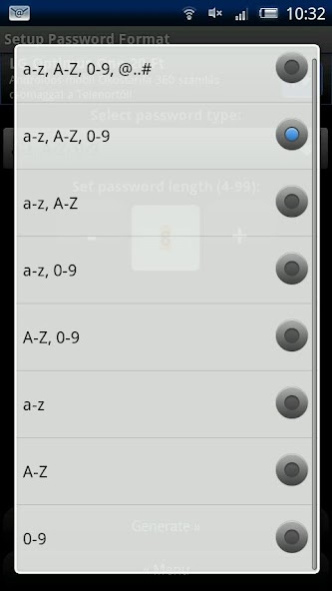
This is a password generator app, that allows you to generate passwords from simple to the most complex types.
The length of the password is also changeable between 4 and 99, the default is 8.
All data is stored encrypted.
Passwords can contain lower case letters, upper case letters, numbers and special characters.
Note: This app is discontinued for many years. I keep it available if someone uses it, but I don't recommend to use this since there are modern, feature rich free alternatives available.
About Password Generator
The company that develops Password Generator is Tamás Vas. The latest version released by its developer is 1.7.1.
To install Password Generator on your Android device, just click the green Continue To App button above to start the installation process. The app is listed on our website since 2012-12-05 and was downloaded 0 times. We have already checked if the download link is safe, however for your own protection we recommend that you scan the downloaded app with your antivirus. Your antivirus may detect the Password Generator as malware as malware if the download link to hu.drusantia.passwordgenerator is broken.
How to install Password Generator on your Android device:
- Click on the Continue To App button on our website. This will redirect you to Google Play.
- Once the Password Generator is shown in the Google Play listing of your Android device, you can start its download and installation. Tap on the Install button located below the search bar and to the right of the app icon.
- A pop-up window with the permissions required by Password Generator will be shown. Click on Accept to continue the process.
- Password Generator will be downloaded onto your device, displaying a progress. Once the download completes, the installation will start and you'll get a notification after the installation is finished.
Program Details
System requirements
Download information
Pricing
Version History
version 1.7.1
posted on 2012-12-05
Update 1.7.1 (latest):
- Localized the remaining messages that needed to be localized.
- Minor fix
Update 1.7.0:
- Added hungarian localization.
- Added menu button to new savable password selector.
- Redesigned the menu to support new password and multiple password generation modes.
- You can chose now to create a password entry with a random or a manually entered password.
- You are now able to generate 1-100 passwords with one click.
- Minor performance improvements.
version 1.7.1
posted on 2012-12-05
Update 1.7.1 (latest):,- Localized the remaining messages that needed to be localized.,- Minor fix,Update 1.7.0:,- Added hungarian localization.,- Added menu button to new savable password selector.,- Redesigned the menu to support new password and multiple password generation modes.,- You can chose now to create a password entry with a random or a manually entered password.,- You are now able to generate 1-100 passwords with one click.,- Minor performance improvements.
Disclaimer
Official Google Play Link
We do not host Password Generator on our servers. We did not scan it for viruses, adware, spyware or other type of malware. This app is hosted by Google and passed their terms and conditions to be listed there. We recommend caution when installing it.
The Google Play link for Password Generator is provided to you by apps112.com without any warranties, representations or guarantees of any kind, so access it at your own risk.
If you have questions regarding this particular app contact the publisher directly. For questions about the functionalities of apps112.com contact us.
